
Every time someone submits your form:
- The submission is saved inside WordPress
- A notification email is sent (if enabled)
Even if an email fails, your submissions are still stored in the database.
This guide will show you how to:
- View form submissions
- Open and review individual entries
- Delete submissions
- Keep your data organized
Where Submissions Are Stored
All submissions are stored securely in your WordPress database.
To access them:
- Go to your WordPress dashboard.
- Click Ray’s Contact Form.
- Click Submissions.
You will see a list of saved entries.
Viewing the Submissions List
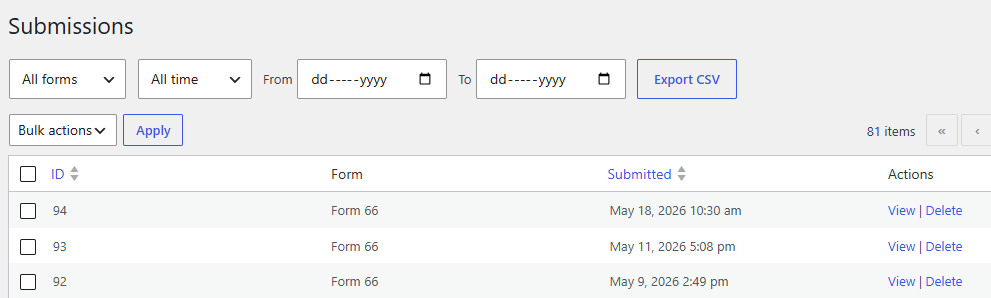
The Submissions page displays:
- Submission ID
- Form name
- Date submitted
- Key field values (such as Name or Email)
Each row represents one form entry.
You can quickly scan this list to:
- See new inquiries
- Identify important messages
- Confirm form activity
Viewing a Single Submission
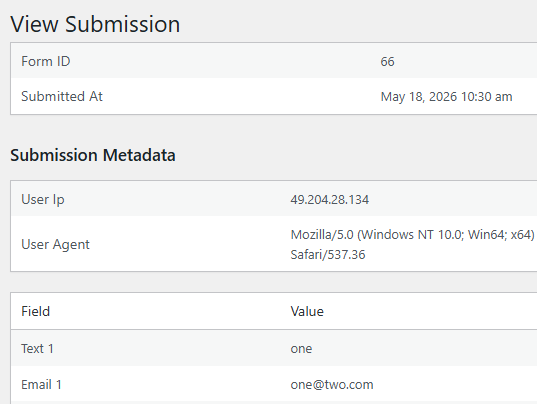
To view full details:
- Click on “view” in the respective submission row.
- The submission detail view will open.
Here you can see:
- All submitted field values
- Submission date and time
- Any additional metadata
This page shows the complete form entry exactly as it was submitted.
Deleting a Submission
If you need to remove a submission:
- Go to the Submissions list.
- Hover over the submission.
- Click Delete.
- Confirm the action.
Deleted submissions cannot be recovered.
Only delete entries if you are certain they are no longer needed.
Why Submissions Are Important
Even if:
- An email fails to send
- The user mistypes their email
- Your hosting email system has issues
The submission is still saved inside WordPress.
This acts as a backup system for your form data.
Best Practices for Managing Submissions
✔ Check submissions regularly
✔ Export important data periodically
✔ Delete spam entries
✔ Keep your inbox and submissions list in sync
Keeping Your Site Organized
If your site receives many submissions:
- Review entries weekly
- Export older data
- Delete outdated entries
This keeps your admin area clean and manageable.
What Happens If I Delete the Form?
If you delete a form:
- You may lose access to its associated submissions.
- Always export important data before deleting a form.
Common Questions
Are submissions stored securely?
Yes. Submissions are stored in your WordPress database and are only accessible to users with proper admin permissions.
Can users see submissions?
No. Only authorized administrators can view submissions inside the dashboard.
What if I don’t receive email notifications?
Check the Submissions page. Your data is still stored even if emails fail.
Next Step: Exporting Submissions to CSV
If you want to:
- Download submissions
- Open them in Excel
- Share them with your team
- Analyze data
You’ll want to export them.