
The Form Settings tab controls settings that apply to the entire form.
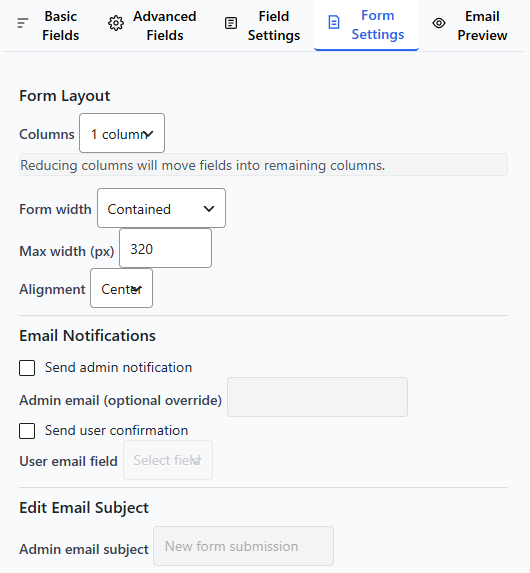
While Field Settings control individual fields, Form Settings manage:
- Number of Columns
- Form width
- Email notifications
This guide explains every available option.
Accessing Form Settings
- Open your form in the Form Builder.
- Click the Form Settings tab.
- Scroll to view all available sections.
Always click Save Form after making changes.
Number of Columns
Select number of columns for your form.
Note: This doesn’t apply to the Free Edition.
Form Width
Form Width controls how wide your form appears on the page.
Common options may include:
- Full Width (100%)
- Contained – Fixed width (e.g., 600px, 800px)
When to Use Full Width
- Modern layouts
- Mobile-first design
- Page sections with wide containers
When to Use Fixed Width
- Centered contact forms
- Landing pages
- Narrow content layouts
The Theme Preview panel updates immediately when you change the width.
Email Notifications
The Email Notifications section allows you to:
- Set recipient email address
- Edit email subject
- Customize email message
- Send to multiple recipients
For detailed instructions, see:
Email Notifications Setup
Spam Protection
To protect your forms from spam submissions, Ray’s Contact Form may include:
- Honeypot protection
Honeypot
A hidden field that blocks automated bots. This runs automatically and does not affect real users. Spam protection works in the background and requires minimal configuration.
Best Practices
✔ Keep your form title clear
✔ Use a friendly success message
✔ Customize the submit button text
✔ Always test email notifications
✔ Review spam protection settings
Common Questions
Does changing Form Settings affect existing submissions?
No. Form Settings affect future submissions only.
Can I change settings after publishing?
Yes. You can edit Form Settings anytime and save changes.
Do I need to configure every setting?
No. Default settings work for most users. Customize only if needed.
What to Learn Next
Now that you understand Form Settings, you may want to explore: